
ClassicFX Groups: Premium AI Photo Booth Setup
Use Snappic ClassicFX Group AI photo booth filters for groups to create on-brand images and deliver premium wedding and corporate event experiences.

August 7, 2025
The Snappic team is passionate about creating unforgettable photo booth experiences.
How to Use ClassicFX Group to Deliver a Premium AI Photo Booth Experience
If you want your AI photo booth to feel premium, on brand, and unforgettable, Snappic’s ClassicFX Group AI filter is built for you. ClassicFX Group lets you create AI-FX filters that transform an entire group of guests into a themed look at the same time, which is perfect for weddings, corporate events, and branded activations.
Instead of editing one person at a time, you can apply AI-FX filters for groups of up to five people in a single image. This gives you a more immersive wedding AI photo booth or corporate event photo booth experience, all powered by Snappic’s premium photo booth software and backed by 24/7 support.

Let’s break down what Snappic's ClassicFX Group is, how to set it up, and why it’s the ultimate upgrade for your AI photo booth business.
What Is ClassicFX Group?
ClassicFX Group is an AI photo booth software feature designed specifically for group photos. It lets you create one AI prompt that applies flawlessly to up to five people while keeping results seamless. To maintain consistent results, all prompts must share a similar style and structure. Your vision. Your style. Every time!
Pro Tip: The ClassicFX Group is available in two versions: Real, for photo-realistic human output, and Styled, for doll-like, cartoon, or artistic looks.
How to Set Up ClassicFX Group in Snappic
Setting up ClassicFX Group in your Snappic dashboard is quick and intuitive. Follow this workflow to get your AI photo booth ready for live events.
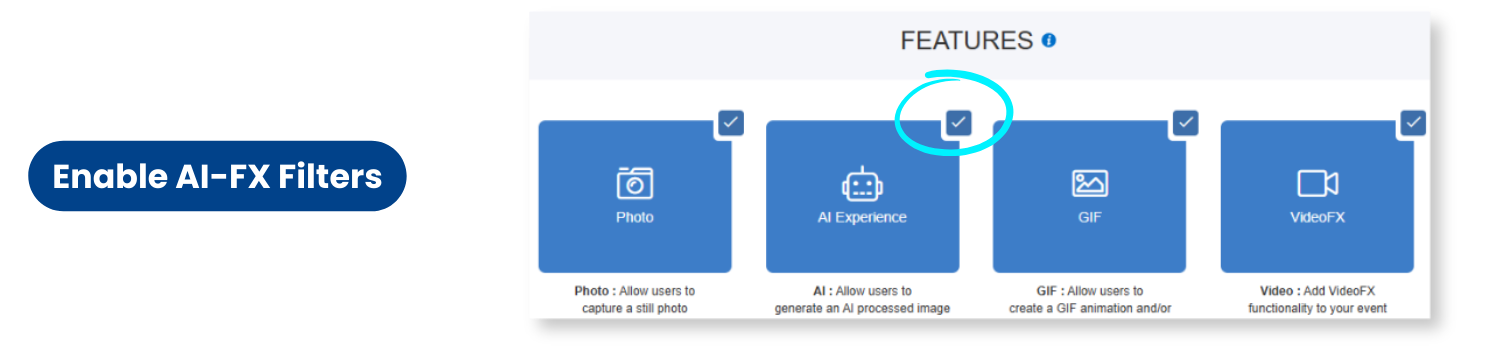
Step 1: Enable AI-FX Filters
Head to your Snappic dashboard, go to the Features tab, and toggle on AI-FX Filters.
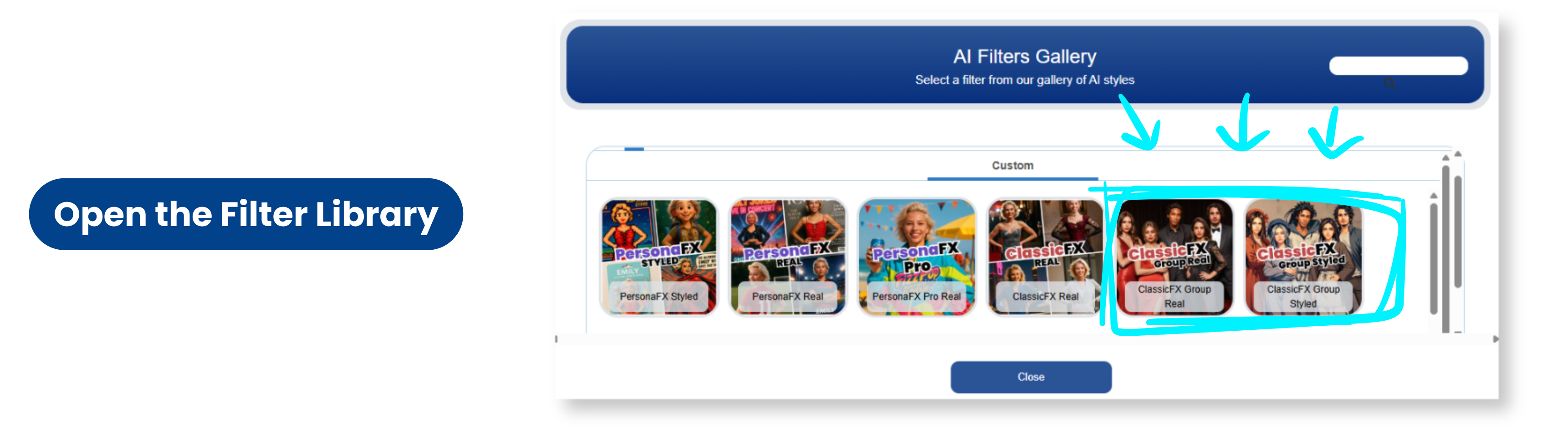
Step 2: Open the Filter Library
Navigate to the Filter Library and select either:
- ClassicFX Group (Real)
- ClassicFX Group (Styled)
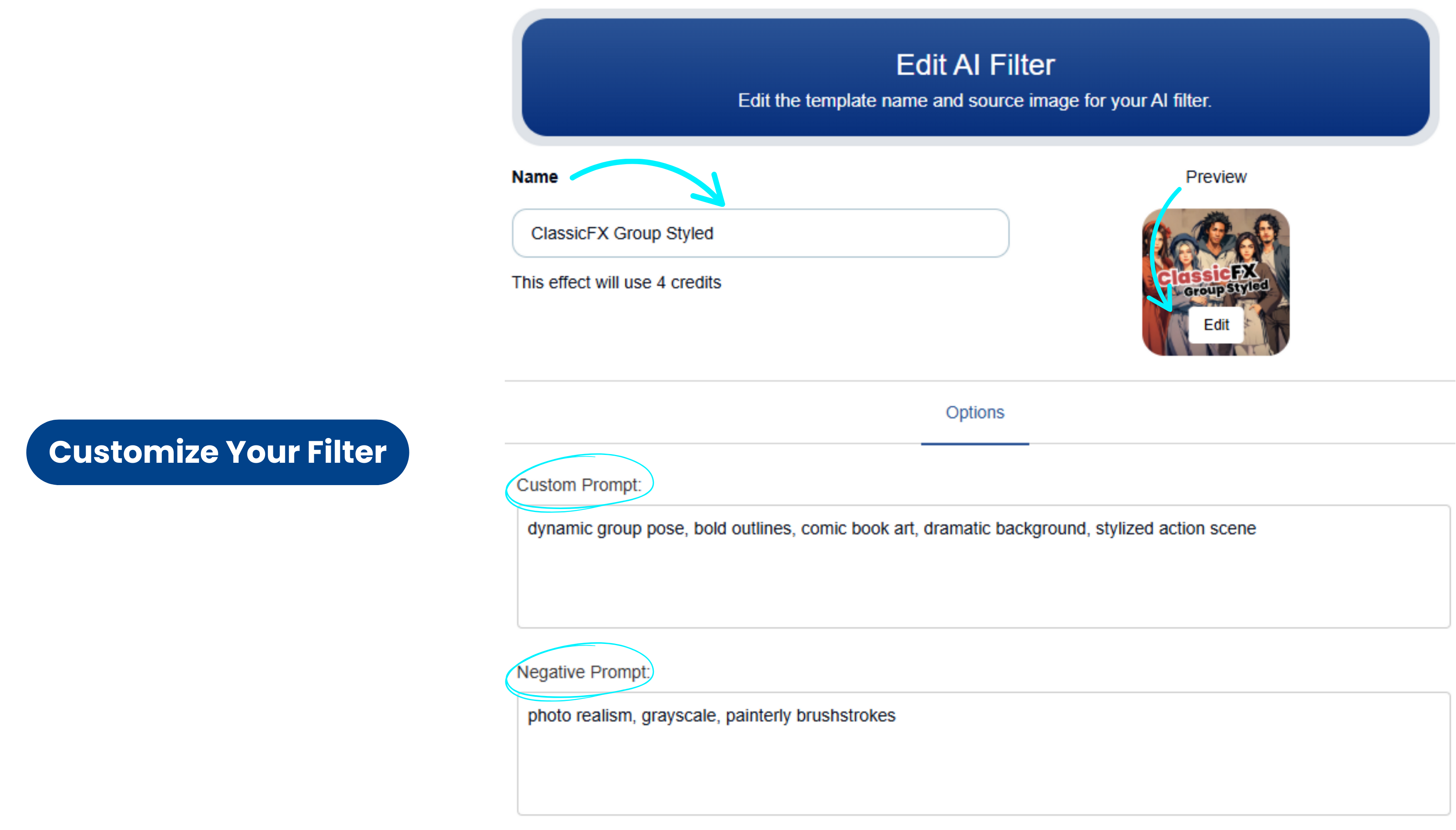
Step 3: Customize Your Filter
- Name your filter
- Upload a custom Preview Image (optional but recommended)
- Add your Custom Prompt
- Add a Negative Prompt (optional) to avoid unwanted details
- Click Confirm
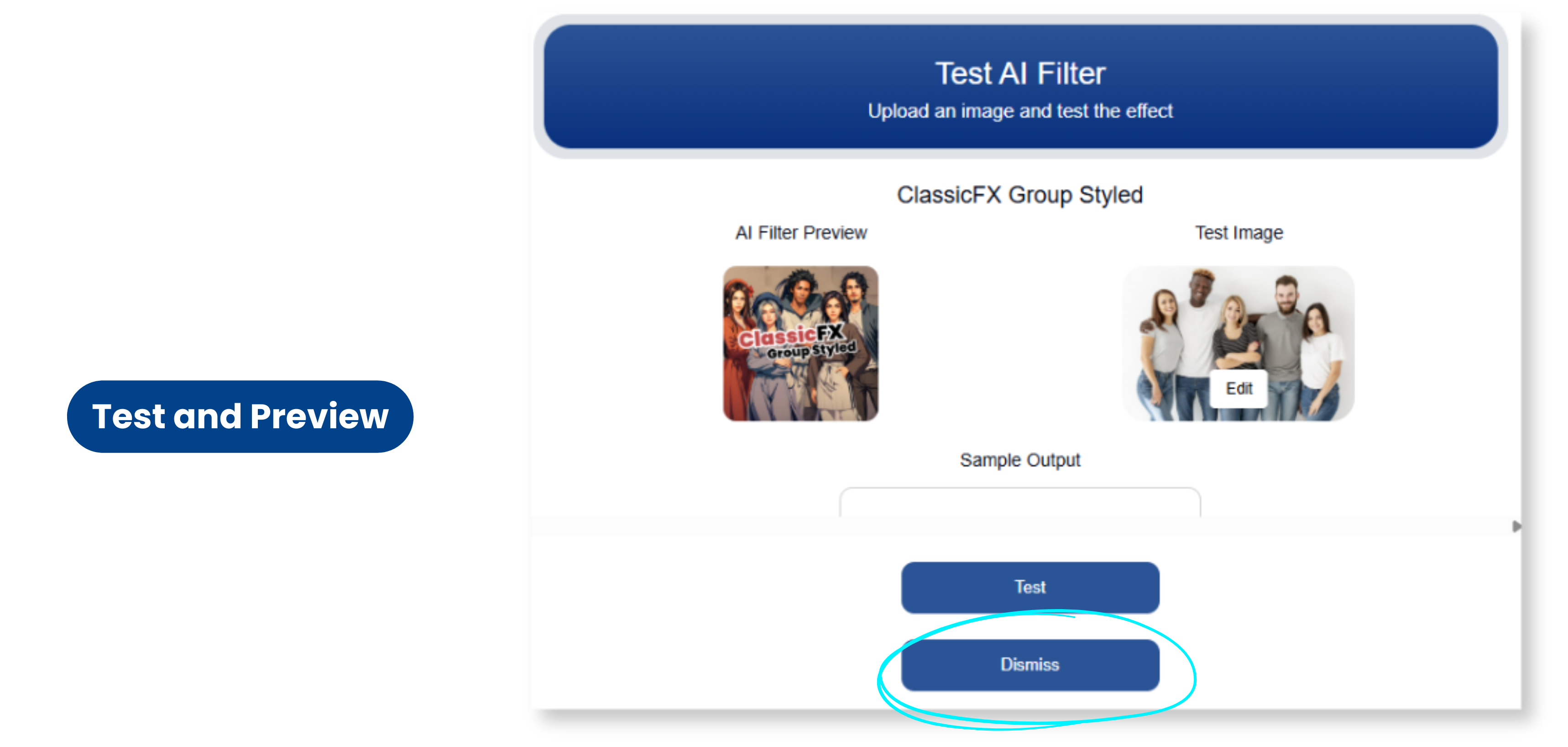
Step 4: Test and Preview
Click on the Test tab on the AI filter to preview your outputs and make any necessary prompt tweaks.
Best Practices for ClassicFX Groups
To ensure smooth AI generation and flawless event delivery:
- Keep all prompts gender-neutral.
- Avoid mentioning hair, facial features, or facial expressions
- Do not specify the number of people or use phrases like "group of people"
- Make sure all prompts are formatted similarly in tone, subject, and style
- Test each prompt individually before using it in a group.
This keeps your AI-FX filters for groups cohesive, especially when you offer several different looks in one premium AI photo booth package.
Output Type Matters
“Real” prompts are for life-like images.
“Styled” prompts are ideal for animations, fantasy looks, or brand-specific visual effects.
Credits, Limits and Processing Time
ClassicFX Group is a more advanced AI-FX filter, so it has its own usage rules:
- Credits per use: Each ClassicFX Group image uses 4 credits.
- Group size: Supports up to 5 people per image.
- Processing time: Typically 2 to 5 minutes, depending on:
- How complex your prompt is
- How many people are in the image
- General system load
Because it is more resource intensive than standard filters, ClassicFX Group is a great upsell in your premium photo booth software packages, especially for clients who want unique, high end group AI photos.
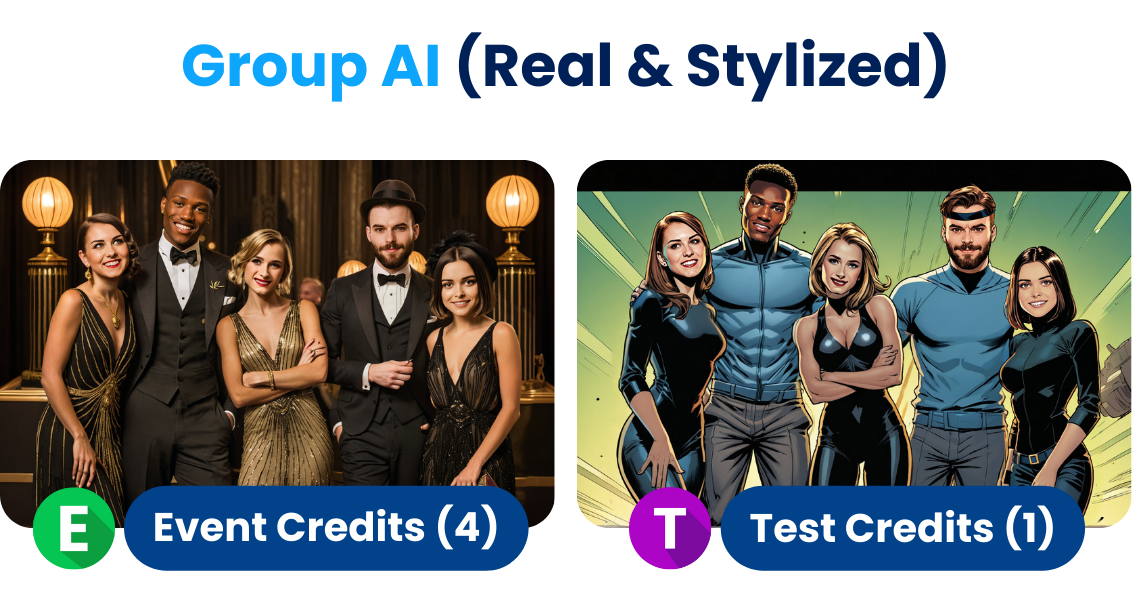
Disclaimer: Despite the safety measures we've implemented, AI-generated outputs may occasionally produce unexpected or unintended results. Snappic does not accept any responsibility or liability for how these outputs are used, interpreted, or applied in live or customer-facing environments. Users are solely responsible for reviewing, testing, and refining all prompts to ensure they are appropriate, accurate, and suitable for their specific use cases.
Why Photo Booth Owners Love This Feature
Snappic’s ClassicFX Group is not just a novelty. It is a strategic upgrade for your AI photo booth business.
- Enhance Guest Experience: Create and offer guests multiple different themed AI looks in a single event. You can add the filter multiple times and customise each one for a different output.
- Stay On-Brand: Create custom AI-FX filters to match your theme
- Perfect for Pros: Ideal for weddings, corporate events, or large festivals
Need Help?
Snappic offers multiple ways to get assistance:
- Visit the Snappic Help Center
- Chat directly from your dashboard.
- Contact our live friendly support team that is 24/7
Ready to Deliver a Premium AI Experience?
With Snappic’s ClassicFX Group, your photo booth becomes more than a booth. It becomes a dynamic, on brand AI experience that guests talk about long after the event.
ClassicFX Group FAQ's:
1. What is ClassicFX Group in Snappic?
ClassicFX Group in Snappic is an AI-FX filter designed specifically for group photos. It lets you build a flexible collection of AI prompts that the system can rotate through or apply selectively, so every event can have multiple on-theme AI looks without extra manual setup. This filter supports up to five people in a single image and is perfect for weddings, corporate activations, and branded AI photo booth experiences.
2. What is the difference between ClassicFX Group Real and ClassicFX Group Styled?
ClassicFX Group is available in two output types: Real and Styled.
- ClassicFX Group Real is built for photo-quality, human-like results that look like natural portraits, ideal for professional events or brand campaigns where realism matters.
- ClassicFX Group Styled is designed for animated, fantasy, sci-fi, doll-like, or artistic looks, which is ideal for themed events, campaigns, or creative brand experiences.
Choosing the right output type helps you match your AI photo booth effects to the style of your event and your client’s brand. ClassicFX Help Centre
3. How many people can I include in a ClassicFX Group AI image?
ClassicFX Group supports up to five people in a single AI-generated image. This makes it ideal for small group photos, wedding parties, brand teams, or VIP groups at activations. The filter is optimized for simpler group compositions and may struggle with very complex poses where people overlap, are partially hidden, or arranged irregularly, so it is best to keep poses clean and readable for the AI.
4. How do I set up ClassicFX Group in Snappic?
To set up ClassicFX Group in your Snappic AI photo booth workflow:
- Enable AI-FX Filters in the Features tab of your Snappic dashboard.
- Open the Filter Library and select ClassicFX for Groups, choosing either Real or Styled.
- Name your filter and upload a Preview Image so clients can quickly see what the effect looks like.
- Add your Custom Prompt and an optional Negative Prompt if you want to avoid certain details.
- Click Confirm, then use the Test tab to generate sample outputs and refine your prompts before the event.
This workflow lets you set up ClassicFX Group as a polished AI photo booth experience ahead of time, ready for any live event.
5. What are the best practices for prompts when using ClassicFX Group?
To get consistent, professional results from ClassicFX Group, follow these prompt guidelines:
- Keep all prompts gender neutral.
- Do not mention hair, facial features, or facial expressions.
- Avoid phrases like “group of people” or specifying the number of people.
- Make sure every prompt in the group uses a similar style, tone, and structure so results are cohesive.
- Match prompts to the correct output type, choosing Real for photo-like images and Styled for artistic or animated looks.
- Test each prompt individually before using it in a live group setup.
These practices help maintain reliability across your AI photo booth sessions and keep your event branding consistent.
6. How many credits does ClassicFX Group use and how long does it take to process?
ClassicFX Group is a more advanced AI-FX filter, so it has specific usage rules:
- Each use of ClassicFX Group consumes 4 credits.
- Processing typically takes 2 to 5 minutes, and can take longer depending on how complex the prompt is and how many people are in the image.
Because it is more resource-intensive than standard filters, it is ideal to position ClassicFX Group as a premium AI experience in your photo booth packages, especially for clients who value unique, high-end group AI photos.
More from Melissa
Previous Post
The Ultimate Guide to Using AI in Your Photo Booth Business
This ultimate guide will show you how to integrate AI into your photo booth business with ease, and how Snappic’s next-gen tools like AI-FX can help you stand out from the competition, boost bookings, and unlock new upsell opportunities.
Next Post
Best Photo Booth Printing Solution
Eliminate photo booth printing headaches with Snappic. Discover why our software delivers unmatched reliability and performance for your events.