From Photo Booth to Roaming Photographer
Turn your photo booth business into a roaming photography powerhouse with Snappic. Capture more moments, share instantly and increase event revenue.

July 15, 2026
The Snappic team is passionate about creating unforgettable photo booth experiences.
From Photo Booth to Roaming Photographer: How to Expand Your Event Business with Snappic
Many photo booth operators run one station at an event. The booth is set up in the corner, a queue begins to form, and for the rest of the night the camera stays locked in place. Meanwhile, across the room, guests are dancing, laughing, and giving speeches. Moments go unseen and undocumented simply because the camera is fixed to a booth setup.
Roaming photography changes that. It lets you take your DSLR and move through the venue, capturing candid and posed photos that guests receive instantly. All running through the same Snappic platform you're already using in your booth.
It's not a replacement for your booth. It's a second revenue stream you can offer alongside it.
Who Is Roaming Photography For?
This isn't a different business. It's an expansion of the one you already run.
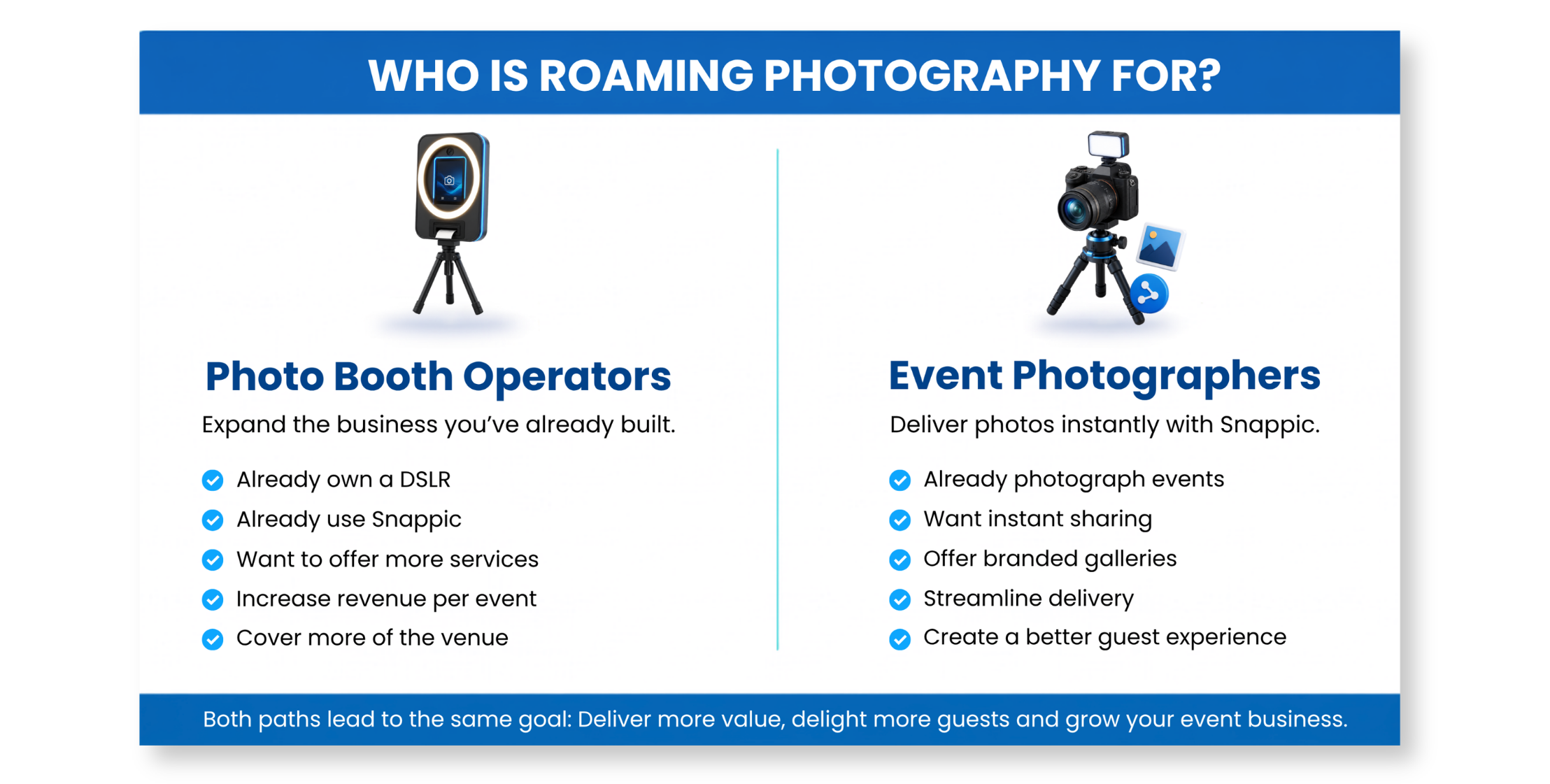
Snappic's new Roaming Photography feature is perfect for existing photo booth operators and emerging operators who want to build a diverse offering by adding an additional service. You already have the DSLR, the iOS device, and a Snappic account. Roaming lets you offer coverage of the parts of the event that a fixed booth can't reach: the ceremony, the dinner tables, the dance floor.
It's also for event photographers who want an instant delivery system. If you're already shooting events with a DSLR, Snappic's Roaming mode gives you instant sharing, branded galleries, and a professional delivery workflow without the need for a separate app or a manual upload process.
The difference between photo booth and roaming modes
Same platform, different workflow. Here's what changes when the camera leaves the booth.
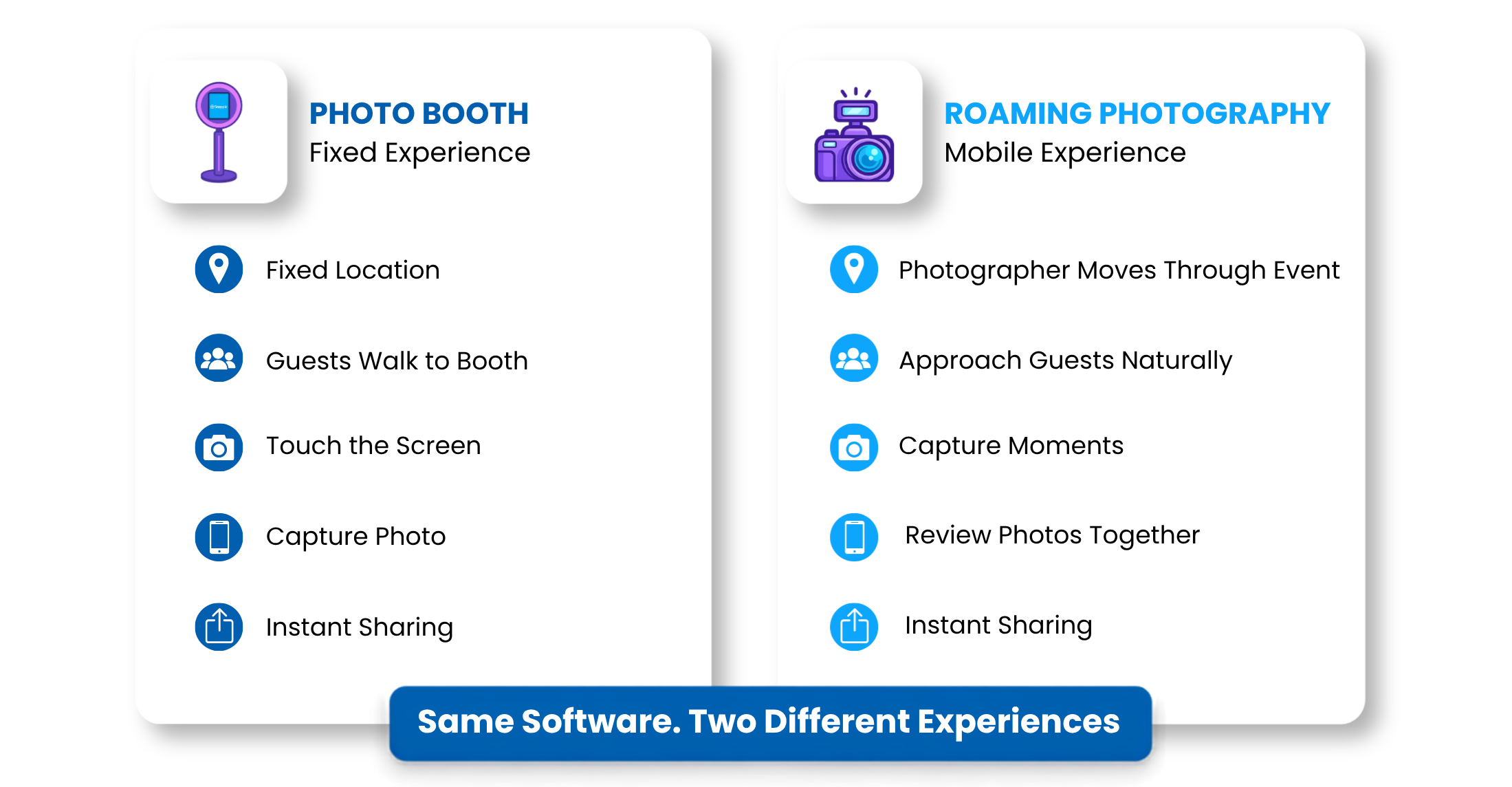
Photo Booth mode
The guest walks up and starts their own session. Or an attendant runs the booth and starts the experiences for the guests. In
Roaming mode
The photographer controls everything: when to shoot, how many shots to take, and when to hand the device to the guest for review and sharing.
The practical differences go beyond just holding the camera:
Session control: You initiate every session rather than guests tapping a screen. This gives you creative control and eliminates the queue-and-wait dynamic experienced at events.
Continuous capture: With excess media enabled, you stay on the capture screen and can take multiple shots of the same group without needing to restart a session. Guests then review the shots and choose their favourites before sharing.
Photo selection: Guests are able to scroll through their photos and pick the options they like best. The result is a gallery where every shared photo is one the guest actually chose.
Instant edits and branding: Snappic's software allows you to edit the photos instantly using AI. Apply skin smoothing, teeth whitening, light fixes and more straight after the image is captured. Templates can also be overlayed to give consistent branding for all images from the event.
Delivery: Guests can opt to receive their photos via QR code, text or email, instantly. No waiting for edits and long delivery times. The photos arrive on their phone while the moment is still fresh.
Gear: Your kit is lighter. Camera on a strap, iOS device on a wrist band (like the VUP Wristband Phone Holder) or belt clip, and a short USB tether between them. No tripod, no enclosure, no lighting rig (though a pocket LED might help in dim venues).
Roaming Photography is available on Snappic's Business, Premium, and Scale Photo Booth subscription plans. It is also available on both the Roaming Photography plans: Pro and Agency. If you're on a tier without access to roaming, you can upgrade from your dashboard.
How Do I Set Up Roaming Mode with Snappic
If you're already running events in Snappic, this is straightforward. Roaming mode lives in the same app.
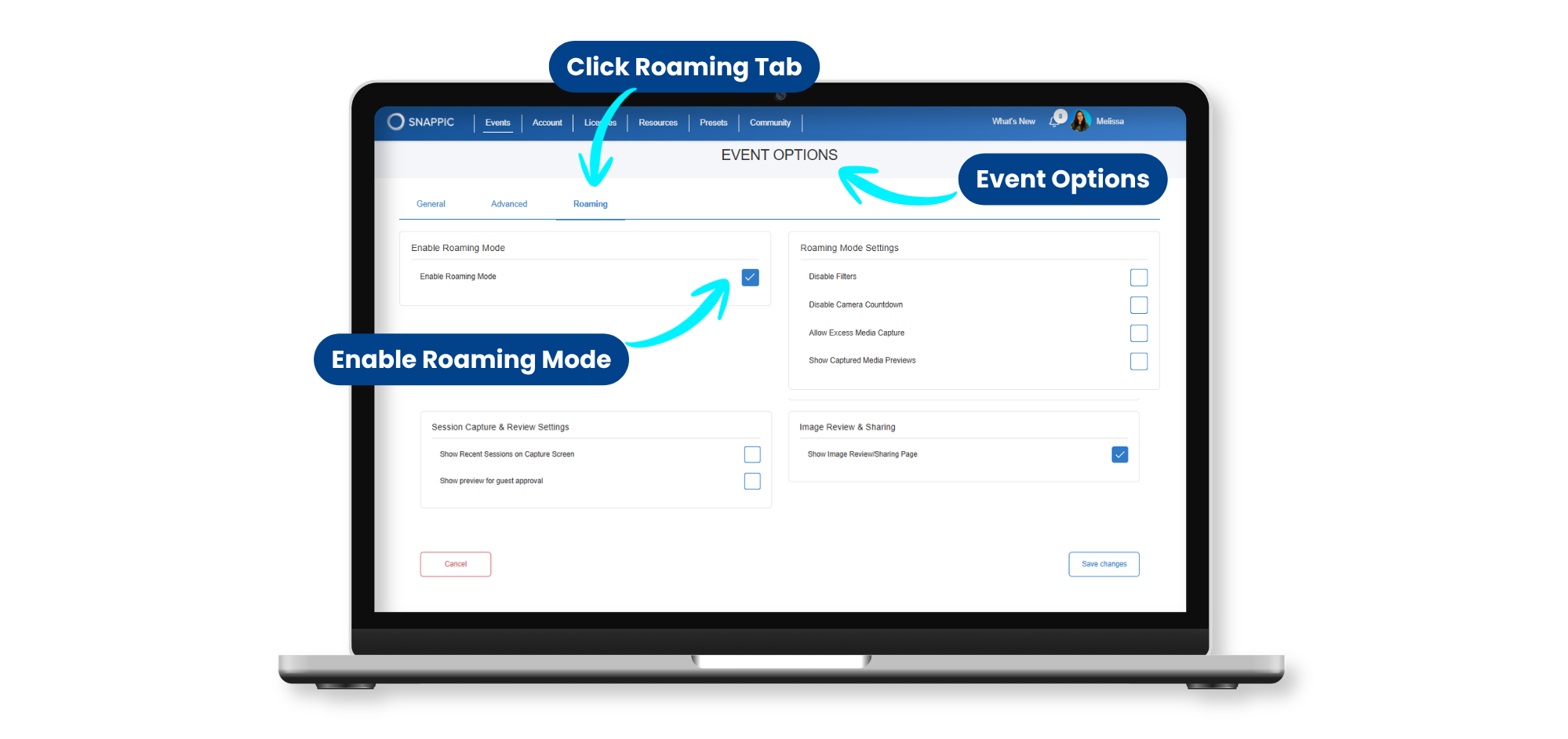
Enabling Roaming Mode
Open your event in the Snappic Dashboard. Go to Event Options and select the Roaming tab. Enable Roaming mode and configure your template, branding, and sharing settings. On the iOS device, switch to Roaming mode in the app. Your DSLR connects via USB tethering the same way it does in Photo Booth mode.
Settings for Different Events
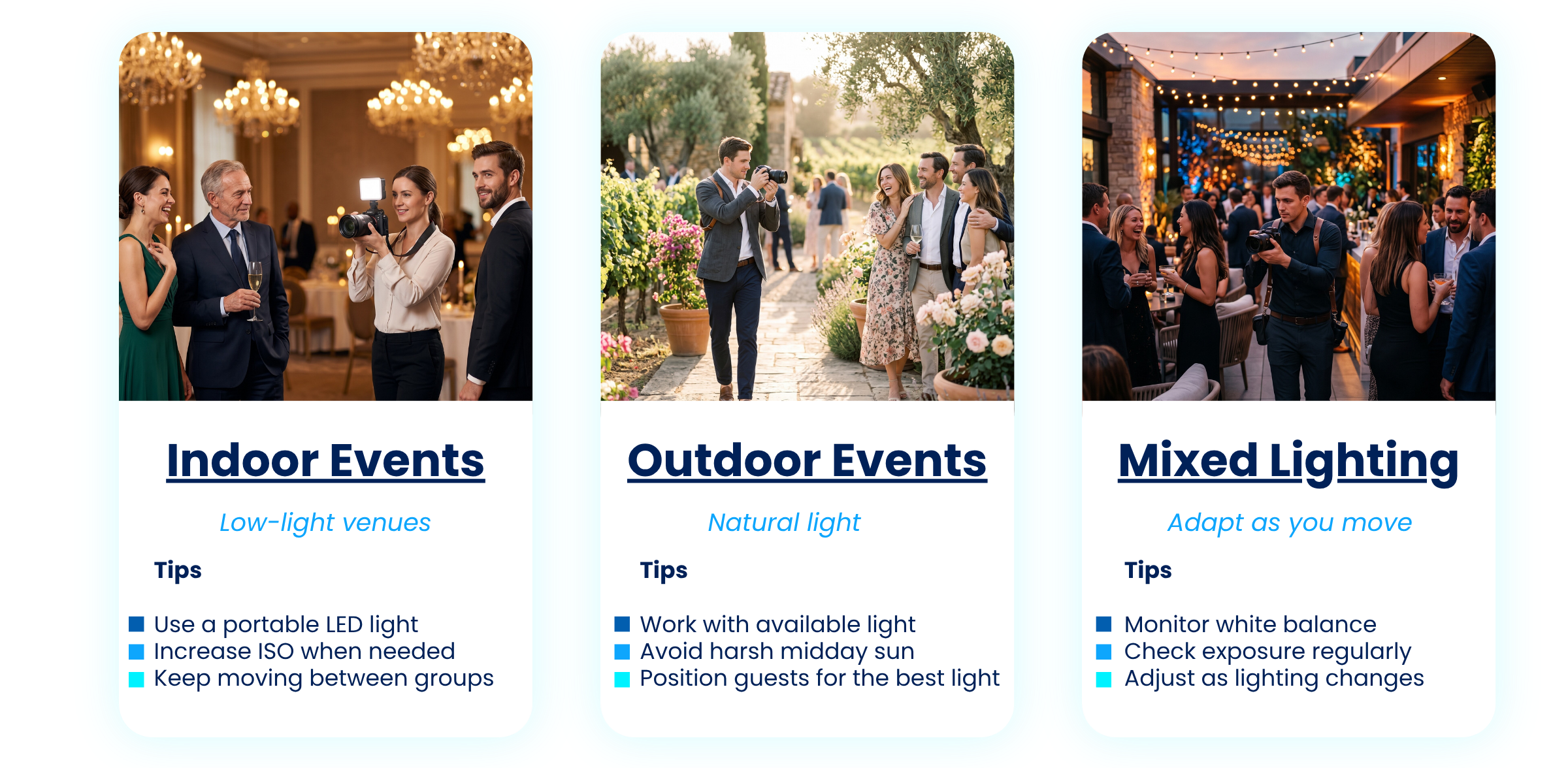
- Indoor events (dim lighting): Set ISO higher (1600-3200), use a wide aperture (f/1.8-f/2.8), and keep shutter speed at 1/125 or faster. Enabling autofocus during capture will enable you to take photos of guests even while they're moving.
- Outdoor events (natural light): ISO stays low (100-400). Narrower aperture (f/4-f/5.6) for sharper group coverage. Shutter speed at 1/250 or faster.
- Mixed indoor/outdoor: Start with indoor settings and adjust as you move between spaces. Set white balance manually to your primary shooting environment.
Retaking a Single Photo
If a multi-photo template has one frame that didn't work, Snappic lets you retake just that frame without reshooting the entire set. To do so, tap the thumbnail in the preview bar, delete, and recapture. This keeps things flowing at busy events where you're moving between groups quickly.
For full equipment recommendations at each price point, see Part 1: The Complete DSLR Photography Setup Guide
How Do I Manage a Camera and Phone Without Dropping Everything?
Camera in one hand, iOS device accessible for guest review. Here's how operators keep it practical.
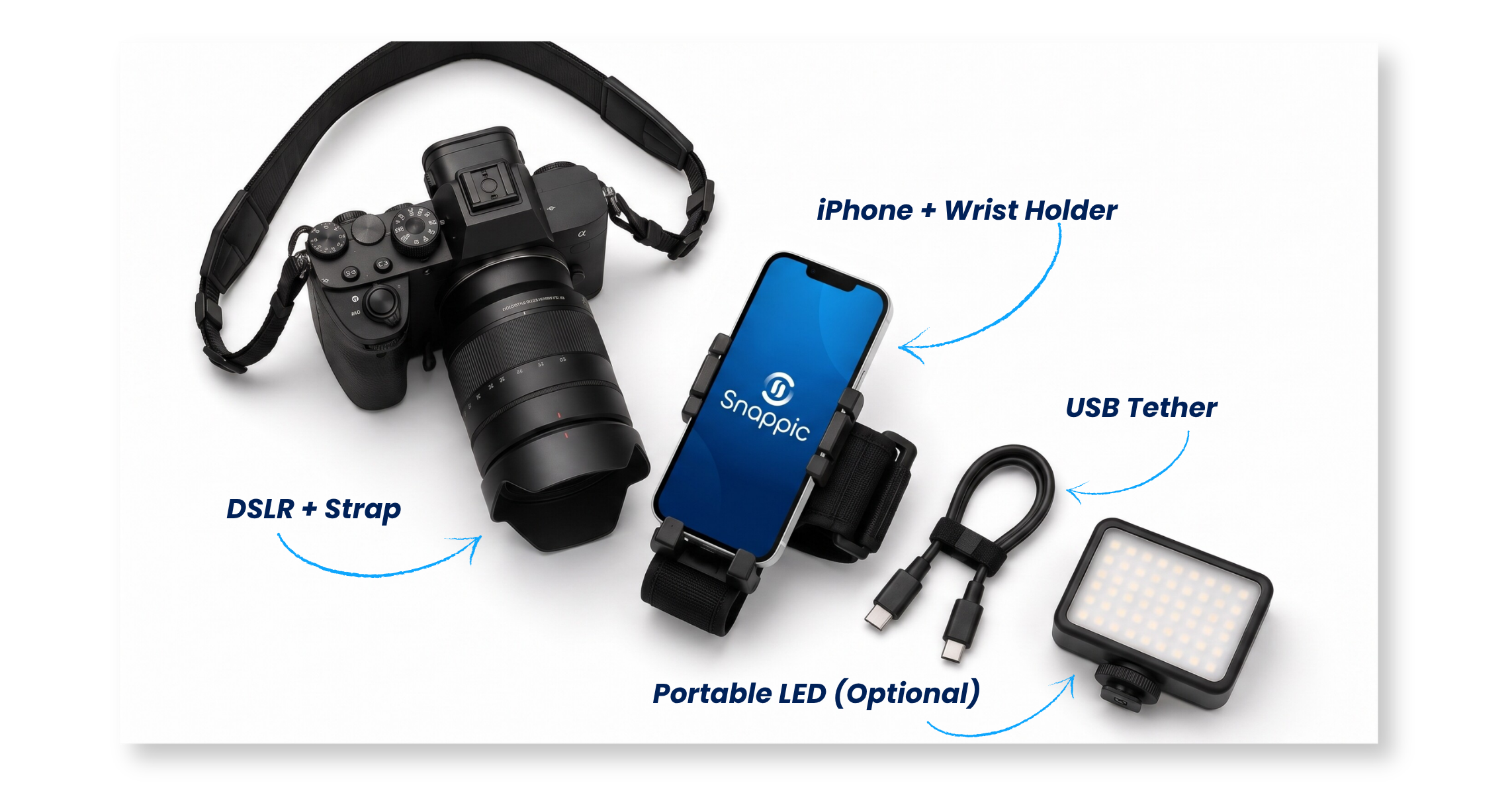
- Your DSLR: Place your camera on a neck or shoulder strap
- iOS Device: You can choose to run Snappic on an iPhone or iPad. We recommend an iPhone in a roaming situation as it is smaller and more mobile. Attach the iPhone to a wrist strap, or attach the iPad to a lanyard around your neck. We recommend the VUP Wristband Phone Holder, which is a great option.
- Cable management: Use a cable to connect the iOS device to your DSLR. A longer cable means more flexibility when you are walking around.
How to Sell Roaming as an Add-On
Packaging, pricing, and pitching roaming photography alongside your existing booth service.
Package It as an Upgrade
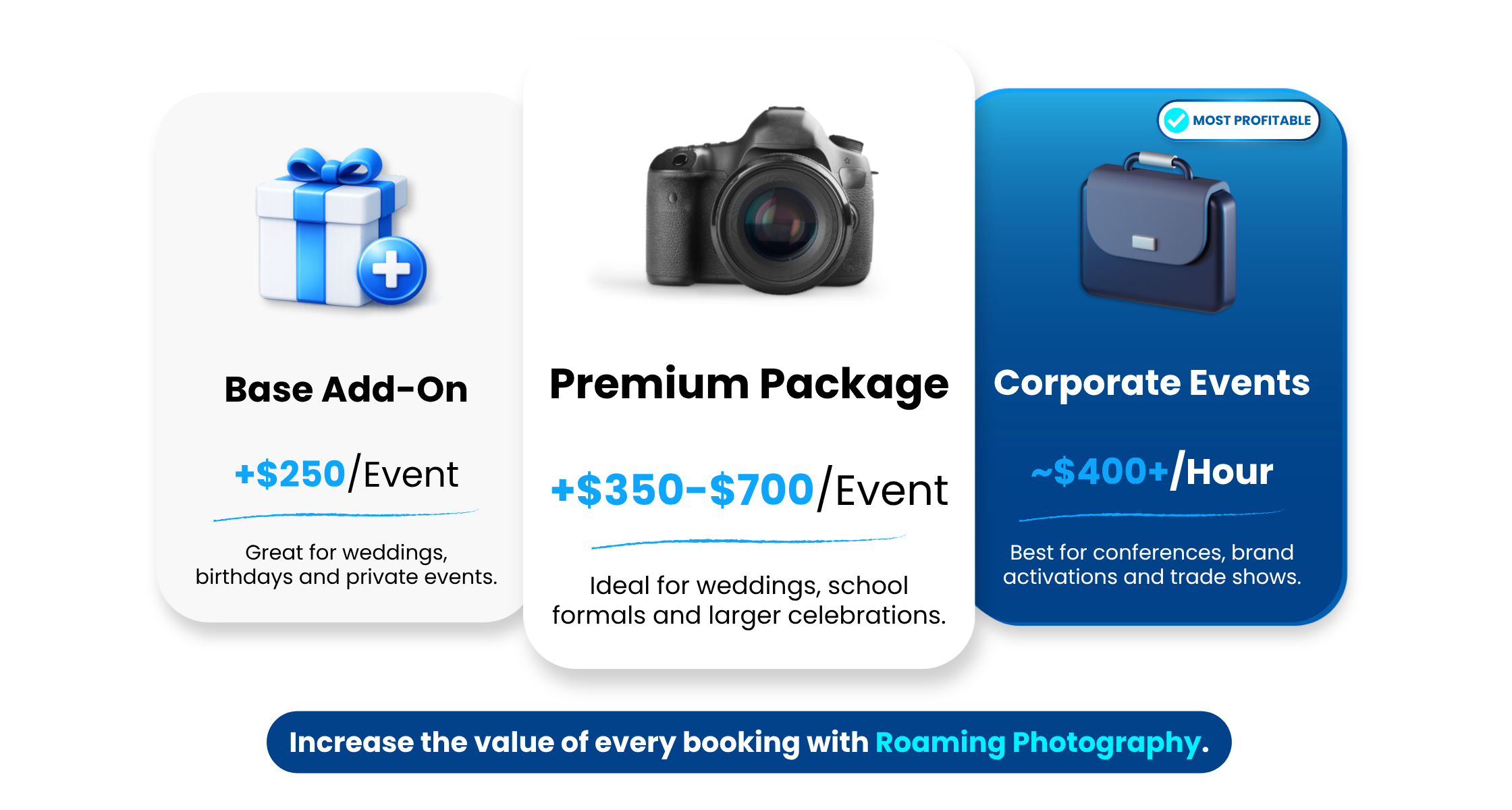
You can position roaming as a premium tier of your existing booth package, not a separate service. Your base package is the photo booth, and the premium package includes roaming coverage as an add-on for the parts of the event the booth can't reach.
- Base: Photo booth for 3-4 hours (your existing offering).
- Premium: Photo booth + 1-2 hours of roaming coverage.
- Full coverage: Photo booth for the full event + roaming from ceremony to close.
How to Explain It to Clients Who've Never Heard of It
Most clients know what a photo booth is. Very few know what roaming photography means, and if they don't understand it, they won't pay for it.
Skip the industry language. Don't say "roaming photography" in the pitch. Say something closer to what the client actually experiences:
"In addition to the photo booth, a photographer will be moving through the event capturing candid and group photos throughout the night. Your guests receive their photos instantly on their phones. That means you get a full gallery of the entire event, not just the booth."
That's it. The client hears: more coverage, more photos, instant delivery, no extra effort on their end. You can introduce the term "roaming photography" once they've said yes, but it shouldn't be doing the selling.
For corporate clients and agencies, you can frame it around content: "You'll have branded event photography delivered directly to attendees in real time. It's coverage that goes beyond the booth and gives you shareable content from every part of the event."
Price It
Roaming adds value without adding proportional cost. That's one of the reasons roaming works well as an up sell. You're already at the event. The marginal expense is the extra hour of your time, or a dedicated photographer.
If you already own a second camera body, your costs are essentially the software and the photographer's time. Some operators hire in a freelance photographer for the roaming portion if they're managing the booth themselves, but even then, the overheads stay manageable.
As a rough guide: the base cost before any profit is around $250 per event. As an upsell on a standard event, operators typically charge $350-$700 depending on hours and deliverables. For corporate events, you can aim for around $400 per hour as a starting benchmark, given the higher value of branded, real-time content delivery.
That margin between cost and charge is where roaming becomes one of the most profitable add-ons in the photo booth business.
Pricing insights courtesy of Photo Booth Marketing. Their free Profit Builder Series includes an event costing calculator that's worth working through if you're building out your pricing structure. Link: Photo Booth Marketing Profit Builder Series
Pitch It
For existing clients who are considering rebooking, here's how you can frame it: "You mentioned some guests never made it to the booth last time. With roaming, I can come to them. Delivering the same quality, same instant sharing, but I'm moving through the room instead of waiting at the station."
For new clients: include roaming in your proposal from the start. Position the premium package as the recommended option and let the client decide whether to scale back.
What a Booth + Roaming Event Actually Looks Like
A walk-through of how hybrid coverage works at a wedding.
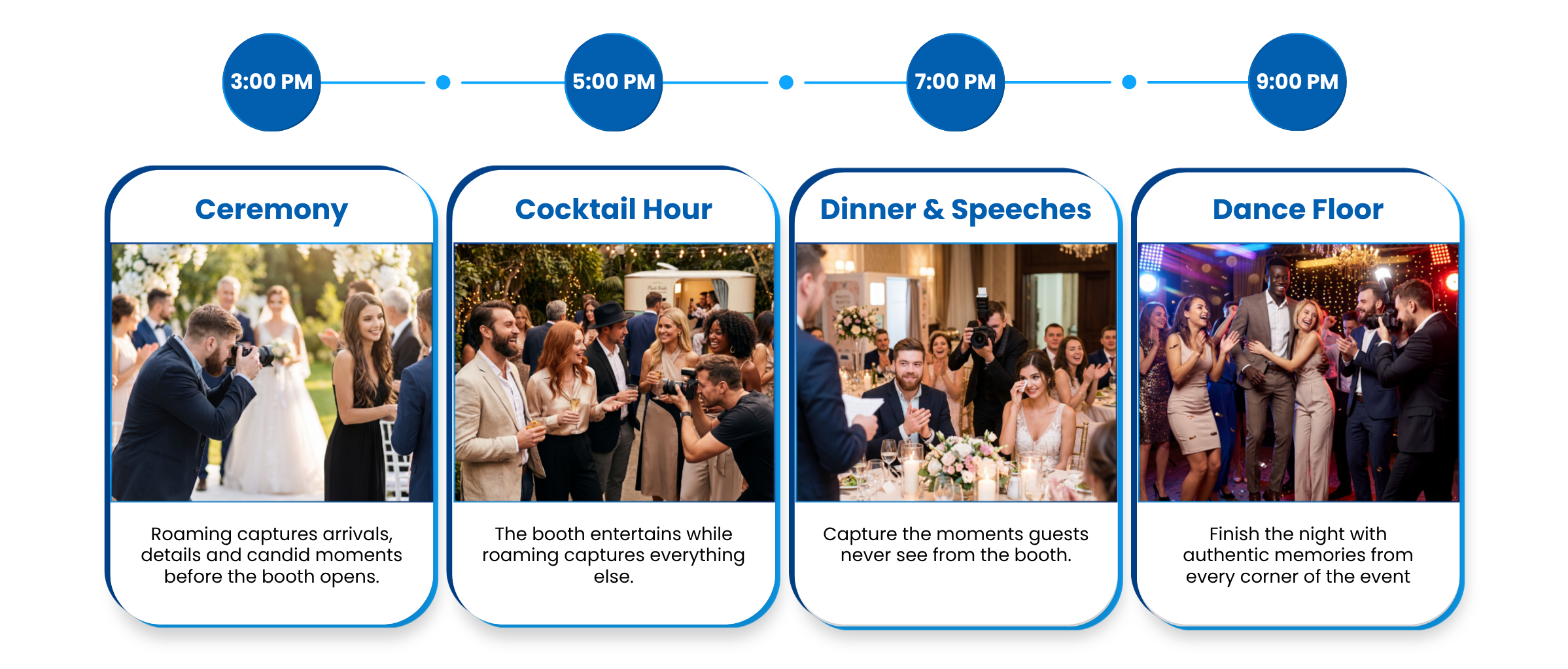
3:00pm, ceremony:
The booth isn't set up yet. The operator roams with a DSLR tethered to their iPhone, capturing candid shots of guests arriving and the ceremony itself. Photos are available for instant sharing via QR code.
5:00pm, cocktail hour: The booth is now running in the reception area. The operator splits time between managing the booth and roaming the cocktail space, capturing table groups and candid moments.
7:00pm, dinner and speeches: The booth stays active for walk-ups. The operator roams during speeches, first dance, and cake cutting. These are the moments guests share most, and the booth can't capture them.
9:00pm, dance floor: Full roaming. The photographer moves through the crowd capturing group shots and candid moments. Guests review and share their favourites on the spot.
The client receives one unified gallery with both booth and roaming photos, all branded consistently, all delivered through the same platform.
If you've run a booth + roaming event, we'd love to feature your setup. Reach out to the Snappic Support team or post in the Snappic Community Group.
Your Booth Covers One Part of the Event. Roaming Covers the Rest.
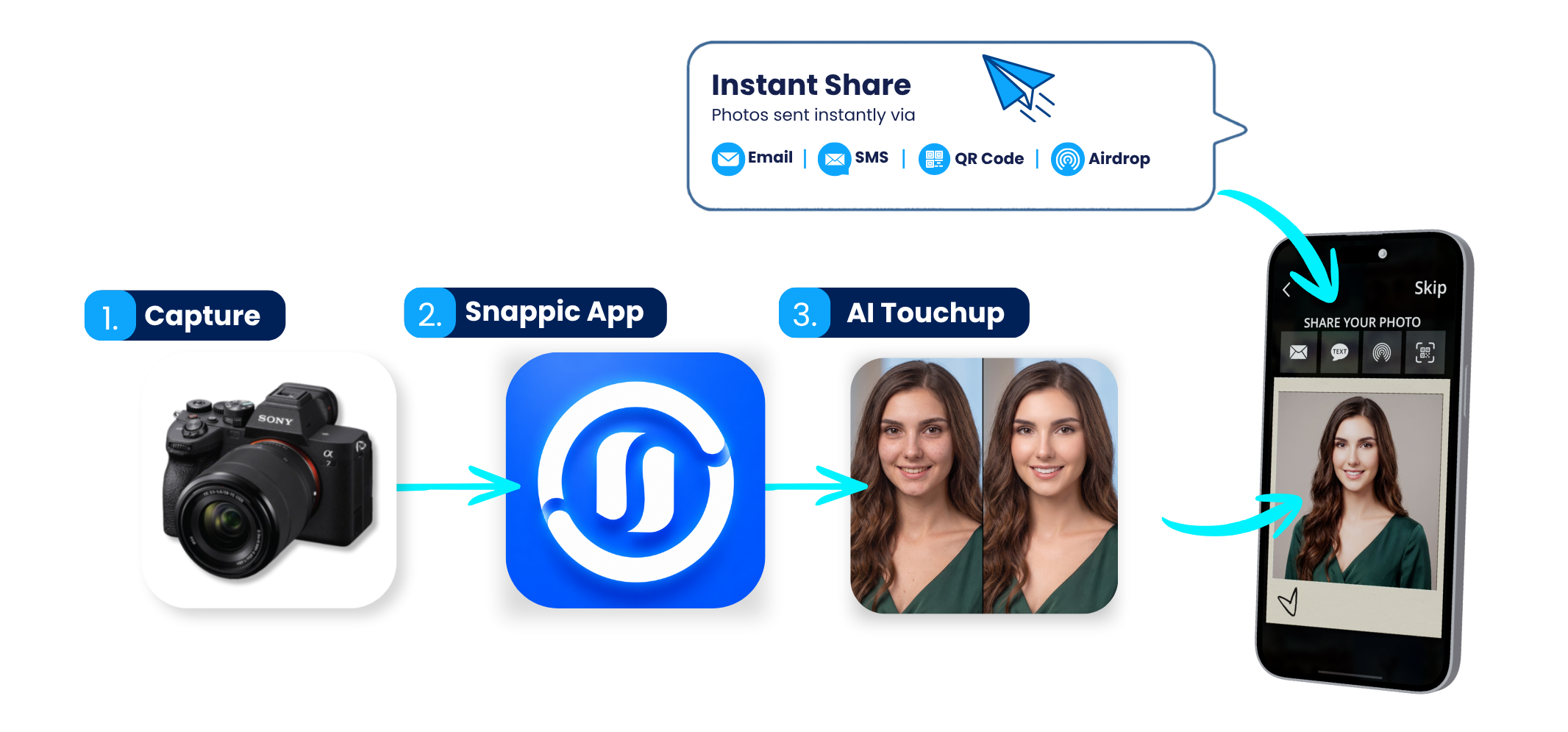
The most valuable thing about adding roaming to your offering is that it doesn't require a new business model. You're already at the event. You already own the camera, the lens, and the iOS device. You already know the platform.
What it changes is your value to the client. Instead of offering one station in one corner, you're offering event-wide coverage. That's a different conversation, a different price point, and a different level of trust.
Roaming Photography is a native Snappic feature. No third-party app, no separate workflow. It runs in the same app, on the same device, with the same branded output.
Start your free trial today! Roaming Photography is included on Business, Premium & Scale plans | Canon, Nikon & Sony compatible.
Am I Ready for My First Roaming Event? A Pre-Event Checklist
Run through this before every roaming event.
✅ DSLR connected to Snappic via USB on your roaming iOS device
✅ Roaming mode enabled in Event Options on the backend
✅ Template and branding configured
✅ Settings tested for venue lighting (indoor/outdoor)
✅ Continuous capture enabled (excess media on)
✅ QR sharing tested (scan, receive, verify)
✅ Spare cable, spare battery, formatted SD card packed
✅ Wrist strap or belt clip for iOS device secured
✅ Short USB cable routed through strap (no snagging)
Related Articles
-> Roaming Photography - Snappic Help Center
FREQUENTLY ASKED QUESTIONS:
1. What is roaming photography?
Roaming photography is a mobile event photography service where a photographer moves throughout the venue capturing candid moments. With Snappic, guests can receive their photos instantly via QR code, SMS or email.
2. Can I add roaming photography to my existing photo booth business?
Yes. If you already use Snappic and own a DSLR or mirrorless camera, adding roaming photography is a natural way to expand your services and increase revenue without replacing your photo booth.
3. What equipment do I need for roaming photography?
A lightweight mirrorless or DSLR camera, a smartphone running Snappic, a USB tether cable and, optionally, a portable LED light are all you need for most events.
4. How do guests receive their roaming photos?
After each photo is taken, guests can review their images and receive them instantly through QR code, SMS or email using Snappic's sharing workflow.
5. Can I offer both a photo booth and roaming photography at the same event?
Absolutely. Many operators run a photo booth in one area while a roaming photographer captures candid moments throughout the venue, giving clients more complete event coverage.
6. Is roaming photography suitable for corporate events?
Yes. Roaming photography is ideal for conferences, brand activations, networking events, award ceremonies and trade shows where guests are constantly moving and interacting.
7. Does Snappic support AI photo enhancements?
Yes. Snappic includes AI Touch Up, which can automatically enhance portraits with subtle, professional retouching while maintaining a natural appearance.
8. How much can I charge for roaming photography?
Pricing varies by market, but many operators offer roaming photography as an add-on to existing photo booth packages or charge hourly for corporate events and brand activations.
More from Melissa
Previous Post
DSLR Photo Booth Setup Guide
Master DSLR camera settings, lighting setups, tethering and troubleshooting for photo booths, roaming photography and professional event photography
Next Post
Snappic + TalleFlow: Photo Booth Business Management
Streamline photo booth bookings with Snappic + TalleFlow. See how photo booth business software automates workflows, CRM, and client management.